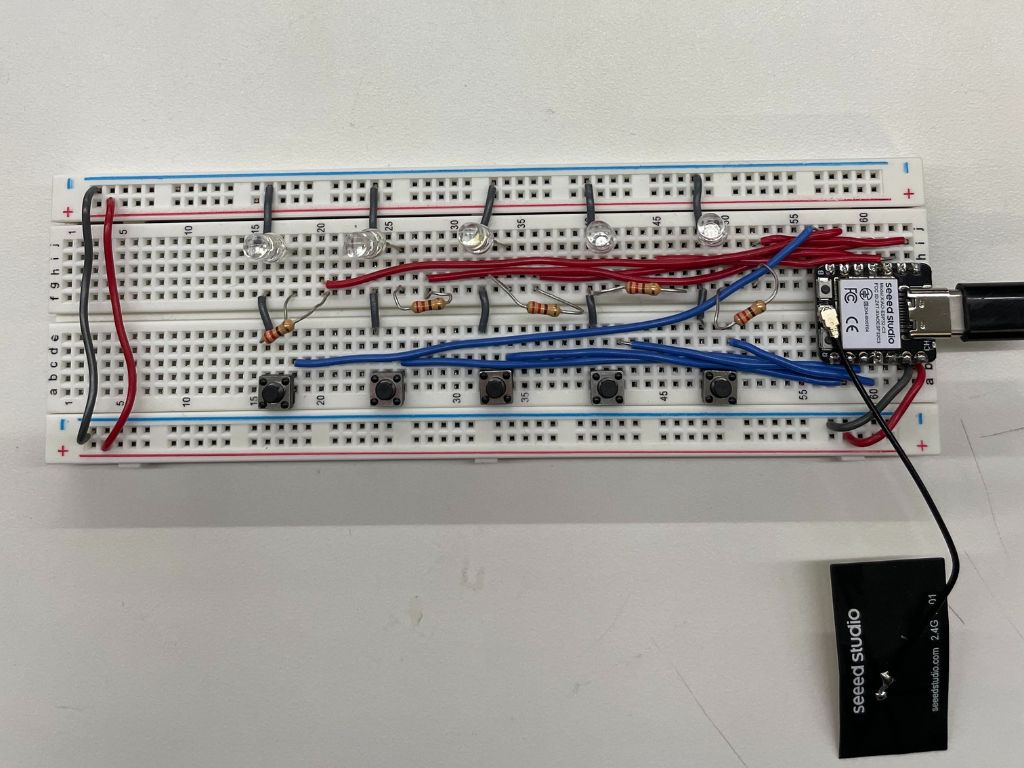
For this week's project, we had to do something with an Arduino. I decided to make a memory game using LEDs and buttons.
The idea
An array of LEDs light up in a random sequence. The user has to repeat this sequence by clicking the corresponding buttons. If the user gets the sequence correct, another light is randomly added to the sequence. This goes on until the user either inputs the incorrect sequence, or the user wins by correctly matching a sequence of X length.
Materials
- ESP32 XIAO
- Breadboard
- Wires
- 5 LEDs
- 5 Resistors (220Ω)
- 5 Buttons
The wiring
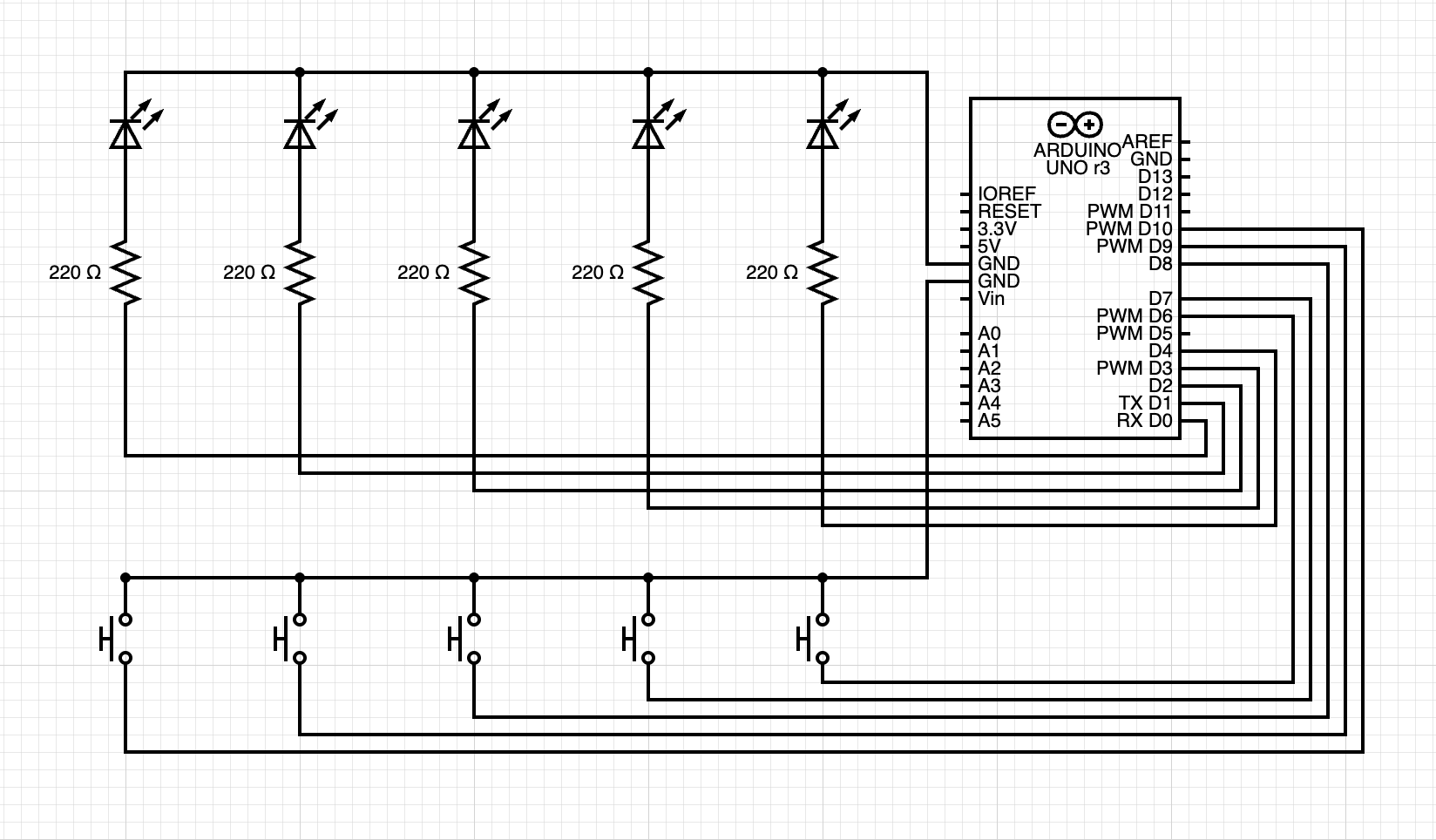
(Made using circuit-diagram.org. Note: the wiring should be adapted to your specific microcontroller. I personally used an ESP32 XIAO, but that was not an available microcontroller on circuit-diagram.org.)
The code
After setting up the breadboard, it was time for me to start the code. First, I started by thinking about how to store the pins and state information of the LEDs and buttons. I decided to make the following Pair class to store each LED–button pair. Each pair is declared by passing in the corresponding LED and button pin numbers.
class Pair{
  private:
    int button_pin;
    int led_pin;
    int last_button_state;
    int current_button_state;
    int led_state;

  public:
    Pair(int button_pin_input, int led_pin_input){
      button_pin = button_pin_input;
      led_pin = led_pin_input;
      led_state = LOW;

      pinMode(button_pin, INPUT_PULLUP);
      pinMode(led_pin, OUTPUT);

      last_button_state = digitalRead(button_pin);
    }
    void resetLED(){
      digitalWrite(led_pin, LOW);
    }
    void toggleLED(){
      led_state = !led_state;
      digitalWrite(led_pin, led_state);
    }
    void updateLEDFromButton(){
      // LED on when button is pressed (LOW due to INPUT_PULLUP)
      current_button_state = digitalRead(button_pin);
      if (current_button_state == LOW){
        digitalWrite(led_pin, HIGH);
      } else {
        digitalWrite(led_pin, LOW);
      }
    }
    bool buttonPressed(){
      current_button_state = digitalRead(button_pin);
      if (last_button_state == HIGH && current_button_state == LOW){
        last_button_state = current_button_state;
        return true;
      }
      last_button_state = current_button_state;
      return false;
    }
};

// Initialize pair vector.
Pair pair_1(D6, D5);
Pair pair_2(D7, D4);
Pair pair_3(D8, D2);
Pair pair_4(D9, D1);
Pair pair_5(D10, D0);
vector<Pair> pair_list = {pair_1, pair_2, pair_3, pair_4, pair_5};
Next, I started working on the game loop logic. I set up the following variables for the game. These store the maximum length of a game, the current length of the game, and the LED sequence the user has to memorize.
void loop() {
  unsigned int max_game_length = 5; // max sequence length
  unsigned int current_game_length = 0;
  vector<int> led_sequence; // contains a sequence of pair #'s by index
  Serial.println("Start Game!");
  game_start_sequence();
Then, I implemented the code to add a random LED to the sequence and display the new sequence. It randomly generates a number corresponding to the index of one of the LEDs in our LED–button pair list.
while (current_game_length < max_game_length){
    // Add a random LED # to the sequence
    led_sequence.push_back(random(5)); // [0,5)
    current_game_length++;
    Serial.println("Game Round " + String(led_sequence.size()));

    // Make sure all lights are off from previous round
    for (int i = 0; i < pair_list.size(); i++)
      pair_list[i].resetLED();

    delay(1000);

    // Display the current LED sequence
    for (int i = 0; i < led_sequence.size(); i++){
      pair_list[led_sequence[i]].toggleLED();
      delay(1000);
      pair_list[led_sequence[i]].toggleLED();
      delay(1000);
    }
Afterwards, I added the logic to read the user's inputted LED sequence and update the game state. If the user enters the incorrect sequence, the game enters its loss state. If the user enters the correct sequence and it was the maximum length, the game enters its win state. Otherwise, the game continues.
// Read user inputted LED sequence
int user_count = 0;
while (user_count < led_sequence.size()){
  for (int i = 0; i < pair_list.size(); i++){
    pair_list[i].updateLEDFromButton();

    if (pair_list[i].buttonPressed()){
      Serial.println("BUTTON " + String(i) + " CLICKED");
      if (i != led_sequence[user_count]){
        // USER INPUT INCORRECT
        Serial.println("GAME OVER: YOU LOSE");
        user_count = led_sequence.size() + 1;
        current_game_length = max_game_length + 1;
        game_lost_sequence();
        break;
      } else {
        // USER INPUT CORRECT
        user_count++;
        delay(300);
        if (user_count >= max_game_length){
          Serial.println("YOU WIN");
          game_win_sequence();
          break;
        }
        break;
      }
    }
  }
  delay(10);
}
I also implemented functions to display special LED sequences for different game states. For example, if the user loses, one of the LEDs displays an L in morse code. To see those sequences and the rest of the code (including headers), download the file below!
↓ LED Memory Game (.ino)Game demo
Reflections
Overall, the game was pretty fun to program. I learned that Arduino has functions like random() built in and that you can still import C++ libraries like <vector> onto microcontrollers. One note to self: remember to turn off your LEDs to keep your patterns and state transitions clean.